Documentation Mercado Libre
Check out all the necessary information about APIs Mercado Libre.
Documentation
Distributed Stock
Distributed Stock aims to allow sellers to configure different stock locations (stock_locations) for the same User Product.
Stock Types
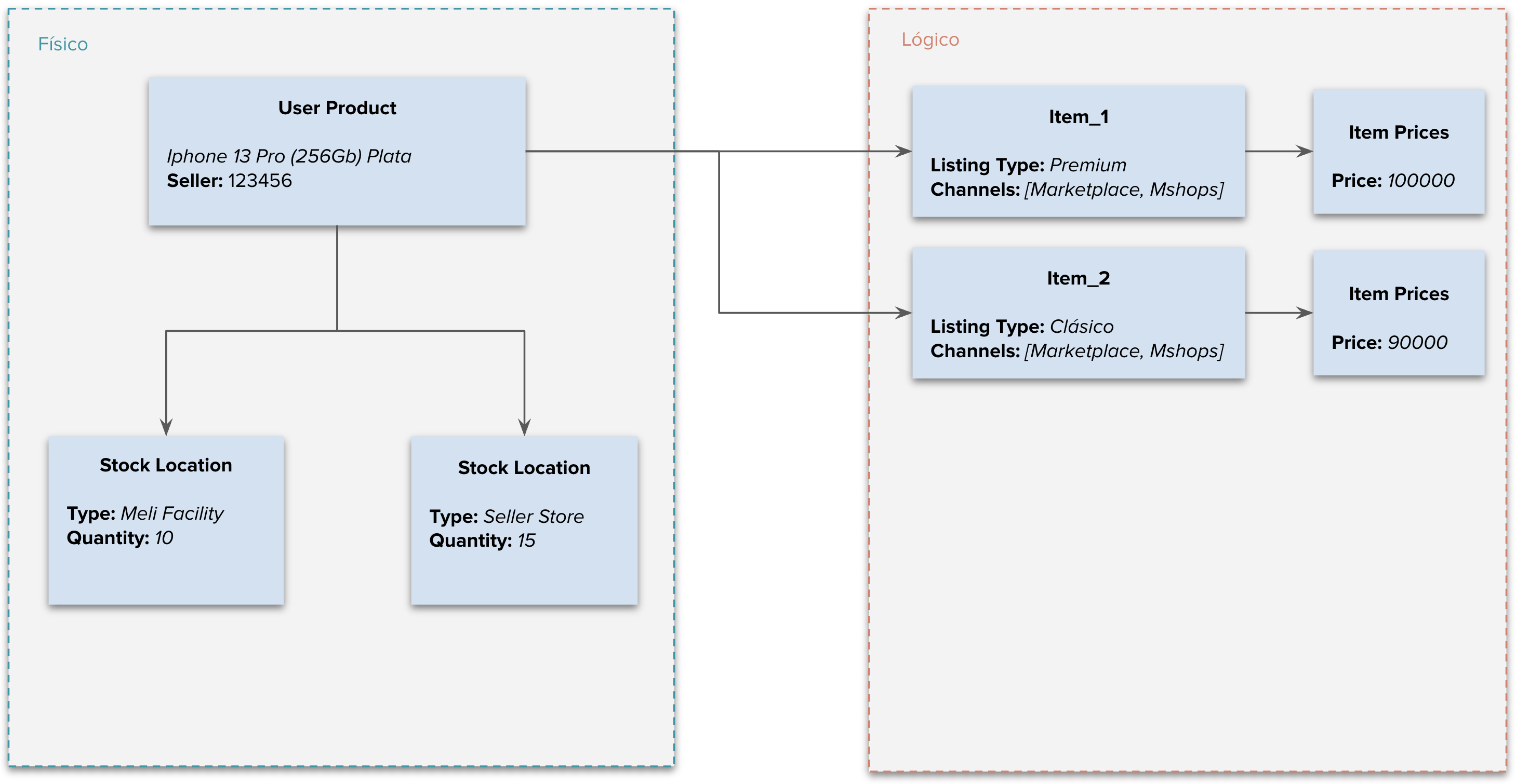
For stock management, we define the following three typologies of stock_locations:
| Location type | Use Case | Stock Manager | Allows editing stock via API |
|---|---|---|---|
| meli_facility | The seller sends their stock to Mercado Libre's Fulfillment warehouses. | Mercado Libre (Full) | No. |
| selling_address | Seller's origin warehouse that represents non-fulfillment logistics such as: crossdocking, xd_drop_off, and flex. | User (Seller) | Yes, in sites where the distributed stock experience for full and flex is enabled, i.e., in MLA and MLC. |
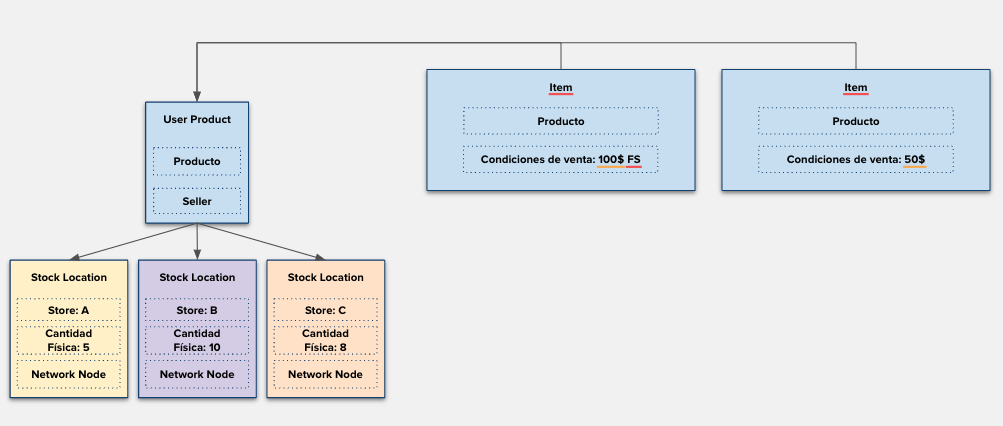
| seller_warehouse | Multiple stock origins managed by the seller. Allows the seller to manage stock from multiple warehouses corresponding to locations where they hold their inventory. | User (Seller) | Yes, as long as the seller is configured for the multi-origin experience and has the warehouse_management tag. |
Example diagram of distributed stock for a User Product with Full - Flex Coexistence in sites where the seller can manage flex stock:
Note:
Example diagram of distributed stock for a seller active in multi-origin with a User Product with stock in different locations:
Get Stock Details
Note that the same UP can have up to two typologies, either (selling_address and meli_facility) or (seller_warehouse and meli_facility).
To query the stock associated with a User Product, you must make the following request.
Request:
curl -X GET https://api.mercadolibre.com/user-products/$USER_PRODUCT_ID/stock -H 'Authorization: Bearer $ACCESS_TOKEN'
Example:
curl -X GET https://api.mercadolibre.com/user-products/MLAU123456789/stock -H 'Authorization: Bearer $ACCESS_TOKEN'
Response example for selling_address typology:
{
  "locations": [
    {
      "type": "selling_address",
      "quantity": 5
    }
  ],
  "user_id": 1234,
  "id": "MLBU206642488"
}
Response example for meli_facility typology:
{
  "locations": [
    {
      "type": "meli_facility", //fulfillment
      "quantity": 5
    }
  ],
  "user_id": 1234,
  "id": "MLBU206642488"
}
Response example for seller_warehouse typology:
{
   "locations": [
       {
           "type": "seller_warehouse",
           "network_node_id": "MXP123451",
           "store_id": "9876543",
           "quantity": 15
       },
       {
           "type": "seller_warehouse",
           "network_node_id": "MXP123452",
           "store_id": "9876553",
           "quantity": 15
       }
   ],
   "user_id": 1234,
   "id": "MLAU123456789"
}
Considerations:
- When querying stock details, a header called x-version will be returned, which will have an integer value (of type long) representing the current version of /stock/.
- This header must be sent when using resources that modify stock for User Products (PUT /stock/type/selling_address and PUT /stock/type/seller_warehouse).
- If not sent, it will return a bad request (status code: 400).
- Additionally, if the version sent is not the latest, it will return a conflict (status code: 409).
- In the case of a 409 response, the stock must be queried again to obtain the updated version of the x-version header.
Manage Stock
Stock management and updating varies according to the seller's configuration and the coexistence of logistics models. Below, the different scenarios and recommendations for updating stock appropriately are described:
- Stock without active multi-origin:
The PUT method must be used on the
/itemsendpoint to update the stock inavailable_quantity. In this case, Mercado Libre will automatically synchronize the stock of all items associated with the sameuser_product_id. - Stock with Full/Flex Coexistence without active multi-origin (locations: meli_facility and selling_address):
- Distributed Stock (applies to MLA and MLC):
Sellers can manage Flex stock independently. To do so, they must update the stock through the endpoint:
PUT user-products/stock/type/selling_address
For more details, consult the documentation: Stock Management in Full and Flex Coexistence.
- Without distributed stock (other sites operating with Full and Flex):
In these cases, sellers cannot update Flex stock independently.
- Distributed Stock (applies to MLA and MLC):
- Multi-Origin Stock with Fulfillment, Cross Docking, Flex, or other logistics coexistence:
In cases where the seller has Multi-Origin (
warehouse_management) enabled and the same User Product (UP) has more than one active logistics (e.g., Fulfillment, Cross Docking, Flex), stock management must be performed based on the warehouse associated with each logistics. This allows different logistics to coexist and the available inventory in each warehouse to be managed independently.- Fulfillment Stock (Full): Corresponds to inventory stored in Mercado Libre's distribution centers. This stock can only be increased by sending products to Full warehouses from the Mercado Libre dashboard.
- Local Stock (Cross Docking, Flex, or other seller logistics):
Corresponds to inventory managed from the seller's or integrator's own warehouses, identified as
seller_warehouse. This stock is managed through the endpoint:
PUT /user-products/$USER_PRODUCT_ID/stock/type/seller_warehouse
Additionally, the seller can associate Flex or other logistics to whichever warehouse they choose, configuring it from their Mercado Libre account. Each warehouse will have its quantities managed independently.
Next documentation: Multi-Origin Stock.